 Pashaberi
With friends or family. Photos with a voice.
Look back at a photo,and hear that day's voices.
One photo, with 10 seconds of voice as you take it. Keep a child's words and the family's laughter together with the picture.
A friend’s “Cheers!”, a “Wow!” on a trip, or your family’s laughter.
Coming soon to the App Store and Google Play
Free to use. Pro is a one-time purchase.
Requires iOS 17.0+ / Android 8.0+

Example speech bubble on a photo: Cheers!
Speech bubble text is entered by hand.
How it works
Tap, say something,
and tap again.
Start with your usual “Say cheese.” Recording stops after 10 seconds in total.
Record a voice
Tap the “Record” button in the center to start recording the voices around you.
Take a photo
Say something, then tap the same button again to take the photo. Recording continues after the shot and stops at 10 seconds in total.
Look back and listen
A year or two from now, revisit the photo and hear that moment again.
Wait without tapping again: a photo is taken after 10 seconds, with everyone’s voices.
Voices you can see, too
A few words still come through,
even with the sound off.
Add the words you recorded as speech bubbles or captions. Even on a train, you can get a sense of the moment just by looking at the photo.
You enter the text yourself. All speech bubble styles are free, with no limit on how many you add.

Example speech bubble on a photo: You've grown so much.
The words you recorded
can be speech bubbles, too.
Speech bubbles give voices a visible form.

Example speech bubble on a photo: Cheers!

Example speech bubble on a photo: Let’s come back again.
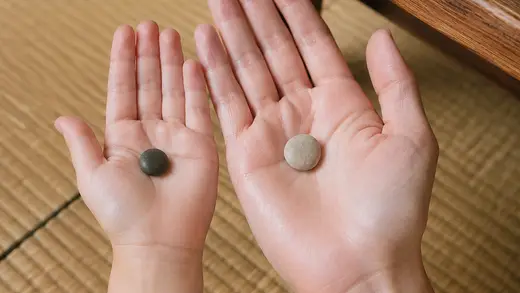
Example speech bubble on a photo: We found two.

Example speech bubble on a photo: Your hand is warm.
Speech bubble text is entered by hand.
A story beyond one photo
Put 4 photos together
to tell the story of that day.
A day out with friends or a day with family. Pick four photos to make a comic that plays each voice in sequence.
Export a video with sound to send to friends and family.
Every 4-frame layout and export option is free.
Family records, close at hand
Your photos and voices
are not sent to the developer's servers.
Photos and voices are saved in the app. The developer has no server for receiving them.
Copies may also exist outside your device through your Photos app's cloud sync, OS backups, or exports and shares you make. See the Privacy Policy for details.
Deleting the app also deletes the photos, voices, and edits stored in it. The developer cannot restore them. Copies already saved in your Photos app remain, but they cannot restore the app's editing data.
The free version includes ads. Ads are not selected based on your past activity. The Privacy Policy explains the network connections and information used to serve ads.
After the photo
So you can listen
to those voices again.
Photos you take can also be saved automatically to your usual Photos app: videos (MP4) for photos with voice, images (JPEG) for photos without sound. “Also save to Photos” is on by default.
Saving requires the permissions appropriate for your device and enough storage space. Open important photos in your Photos app to check they saved.
If you use iCloud Photos or Google Photos, check that your photos and videos are included in sync or backup and that saving has finished.

Open a photo, and the voice recorded with it plays.
Auto-save right after taking a photo
- Photos and voices you capture
- Saved in the app. They can also be saved automatically to your Photos app.
- Text added later and 4-frame stories
- Not included in auto-save. Export them when you need them.
Before changing phones, check that your photos and voices are saved. See the checklist for changing phones →
Whether in-app data transfers depends on your device settings and how you migrate. The developer has not yet tested migration on physical devices. Export important records as videos (MP4) and keep a copy elsewhere.
In the free version, photos and videos saved to your Photos app also have a Pashaberi watermark. Turn off auto-save under Settings → “Taking photos” → “Also save to Photos”.
Pricing
Enjoy keeping your moments, for free.
Take photos, save them, look back, and add your own touch. The features you need for everyday memories are free.
Free version
¥0
No limit on the number of photos or uses.
- 10-second recording, photos, saving, and playback
- Every speech bubble style, with no quantity limit
- Every 4-frame layout
- Export photos and videos with sound
Use it within your device's available storage. The free version shows ads and adds a Pashaberi watermark to exports.
Pashaberi Pro
One-time purchaseNo monthly fee
For a little more comfort as you capture.
- Hide ads
- Remove the watermark from exports
Check the store’s purchase screen for the actual price. There is no monthly fee.
Photos and voices, in your own language.
The app interface supports 12 languages, including Japanese.
This refers to the app interface. It uses a supported language from your device's language settings.You can also change this page's language using the list above.
Frequently asked questions
A few things to know before you start.
Can I really use it for free?
Yes. Taking photos, saving, playback, all speech bubbles and 4-frame layouts, and export are free. Pashaberi Pro removes ads and watermarks with a one-time purchase. Check the store’s purchase screen for the actual price.
Can family members view it without the app?
Export a video with sound (MP4) to share with someone who doesn't have the app. Exporting only a photo (JPEG) does not include audio.
When can I listen to the voice I recorded?
Open a saved photo yourself, and you hear the voice recorded with it. You can look back any time after taking it. The app does not send anything automatically or notify you at a later date.
What happens to my records when I change phones?
You can view photos and videos saved to your Photos app and fully backed up to its cloud service through that service. Before changing phones, check that the photos open and the voices play. The app has no migration feature of its own. Restoring in-app data depends on OS settings and the migration method. Android's cloud backup for app data does not include photos or audio. Exported photos and videos cannot restore editing data in the app, either.See the checklist for changing phones →
Can I turn off auto-save to my Photos app?
Turn it off under Settings → “Taking photos” → “Also save to Photos”. This applies to photos taken from then on. Existing copies remain in your Photos app; delete them there if you don't need them. In the free version, automatically saved photos and videos include a Pashaberi watermark.
Which languages does the app support?
Japanese, English, Spanish, Italian, French, German, Portuguese (Brazil), Arabic, Thai, Vietnamese, Simplified Chinese, and Korean. The app uses a supported language from your device settings. There is no language selector inside the app.
Look back at a photo,
and hear that day's voices.
Try keeping a voice with an everyday photo.
Coming soon to the App Store and Google Play. Free to start.